For about $100.00 setup a point-to-point wireless network at 150+ Mbps and up to 15Km line of site range.
Ubiquiti Networks
Ubiquiti's Nano Station Very cool.
Tuesday, March 30, 2010


Monday, March 22, 2010
Free Software Based Enterprise/SMB Firewalls
Buying a traditional appliance based firewall for a business can be expensive. The base models are normally reasonably priced but you get poor performance and none of the bells and whistle's that the expense ones give you. Your also locked into the appliance hardware so the only way to upgrade to better performance is to purchase a brand new firewall and the price curve for better performance normally shoots straight up.
Because of the lack of performance and lack of functionality of the lower end Firewall appliances I have been testing out a few free software based firewalls. The cool thing about software based firewalls is your only limited by the hardware that you install it on. A lot of times and old PC (P3 or P4) will out perform the low end appliances. A bunch of the free open source firewall projects include advanced features like RAIDing your hard drives, clustering multiple devices, Quality of Service, Captive Portal, web filtering, Intrusion Prevention (Snort), and real-time Anti-virus scanning of email and websites.
Sunday, January 24, 2010
Shutdown Script for SBS 2008
Small Business Server 2008 can takes some time to reboot.
Use this script to decrease the shutdown time.
net stop msexchangeadtopology /y
net stop msftesql-exchange /y
net stop msexchangeis /y
net stop msexchangesa /y
net stop iisadmin /y
Use this script to decrease the shutdown time.
net stop msexchangeadtopology /y
net stop msftesql-exchange /y
net stop msexchangeis /y
net stop msexchangesa /y
net stop iisadmin /y
Thursday, December 17, 2009
Exchange 2007 CSR Powershell Script Wizard
Creating a CSR (Certificate Signing Request) with Exchange 2007 is kind of a pain b/c you have to do it through the Exchange Powershell Console.
Here is a Wizard that creates the powershell command for you.
This wizard makes this

look like this.
New-ExchangeCertificate -GenerateRequest -Path c:\Mail_ExternalDomain_com.csr -KeySize 2048 -SubjectName "c=US, s=Ohio, l=Columbus, o=Matt's It Solutions, ou=Messaging , cn=Mail.ExternalDomain.com" -DomainName Mail.InternalDomain.com, AutoDiscovery.InternalDomain.com, AutoDiscovery.ExternalDomain.com, Mail -PrivateKeyExportable $True
Friday, December 11, 2009
TS Web Access Problems.......
I keep running into problems where clients have problems connecting to Terminal Services Web Access site. Looks like Microsoft screwed something up and a year later they still do not have a patch to fix it.
[-HKEY_CURRENT_USER\Software\Microsoft\Windows\CurrentVersion\Ext\Settings\{7584c670-2274-4efb-b00b-d6aaba6d3850}]
[-HKEY_CURRENT_USER\Software\Microsoft\Windows\CurrentVersion\Ext\Settings\{4eb89ff4-7f78-4a0f-8b8d-2bf02e94e4b2}]
[-HKEY_CURRENT_USER\Software\Microsoft\Windows\CurrentVersion\Ext\Settings\{7390f3d8-0439-4c05-91e3-cf5cb290c3d0}]
[-HKEY_CURRENT_USER\Software\Microsoft\Windows\CurrentVersion\Ext\Settings\{4eb89ff4-7f78-4a0f-8b8d-2bf02e94e4b2}]
[-HKEY_CURRENT_USER\Software\Microsoft\Windows\CurrentVersion\Ext\Settings\{7390f3d8-0439-4c05-91e3-cf5cb290c3d0}]
Thursday, December 3, 2009
Test Exchange Active Sync and much more
Found this cool site. It allows you to test the following type of connections to your exchange server and see if they are configured properly.
 | Microsoft Exchange ActiveSync Connectivity Tests |
 | Microsoft Exchange Web Services Connectivity Tests |
 | Microsoft Office Outlook Connectivity Tests |
 | Internet Email Tests |
Thursday, November 19, 2009
Good Virus Removal Guide
I came across this virus removal guide and it's pretty good.
There is one thing that I would add to this guide and in my opinion is the single best AV tool that you can add to your tool kit.
There are some very good scanners (Malwarebytes, SUPERAntiSpyware, VIPRE, NOD32) but VIPRERescue is unique in that it can be run from a USB drive or CD in Windows Safe Mode Command Prompt.
There are times when you cannot install any of your tools because the virus blocks any attempt to install or run them. If you boot to Windows Safe Mode Command Prompt, you can run VIPRERescue and clean the computer enough so that you can then install your normal AV tools to clean it the rest of the way.
Friday, October 9, 2009
Product Key Finder
Product Key Finder
Product Key Finder is a free Windows application that retrieves license key information (CD Keys) from the Windows registry. Product Key Finder currently supports retrieval of 200+ windows applications such Microsoft Windows, Microsoft Office and Adobe Acrobat.
Thursday, September 24, 2009
Mail Browser Backup
MailBrowserBackup
I came across good open-source application this week for backing up Internet browser bookmarks, Email, IM friends list, and a bunch more.
Here's a list from their website.
Mozilla Firefox
Flock
Windows Mail
Windows Live Mail
Windows Live Messenger
Windows Live Messenger Plus
Internet Explorer (Favorities ONLY)
Outlook 2003/2007
Windows Contacts
Windows Calendar
Mozilla Thunderbird
Opera (browser profile and mails)
Apple Safari
Google Chrome
SRWare Iron
FileZilla FTP Client
Notepad++
Pidgin
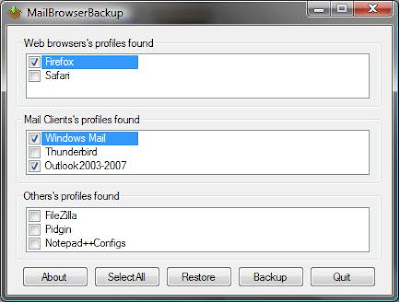


I came across good open-source application this week for backing up Internet browser bookmarks, Email, IM friends list, and a bunch more.
Here's a list from their website.
Mozilla Firefox
Flock
Windows Mail
Windows Live Mail
Windows Live Messenger
Windows Live Messenger Plus
Internet Explorer (Favorities ONLY)
Outlook 2003/2007
Windows Contacts
Windows Calendar
Mozilla Thunderbird
Opera (browser profile and mails)
Apple Safari
Google Chrome
SRWare Iron
FileZilla FTP Client
Notepad++
Pidgin

Wednesday, September 9, 2009
Free VM Converter Tool
Convert VMware VMDK virtual machines to Microsoft VHD virtual machines, or the other way around Microsoft to VMware.
Free converter tool here
Free converter tool here
Tuesday, September 8, 2009
Free Anti-SPAM solutions for Small Buisness
I have been doing some research lately on Free/Open Source Anti-SPAM solutions. I have found 3 that look very promising. I hope to have the time to test them this week.
1. Proxmox
Proxmox is a commercial product but offers a free version for single domain environments. It does not have all the bells and whistles as the full blown pay version but still looks like a good product. It can also be downloaded as pre-installed VM for easy setup.
2. ASSP
ASSP (Anti-Spam SMTP Proxy) is 100% open source. Looks to run on windows or nix.
3. Untangle
Untangle is an open source suite of goodness. This looks to be very interesting. There is a huge list of plug-ins for this application. Most plug-ins are free.
Some Free plug-ins
Web filter
Virus Blocker
SPAM Blocker
Ad Blocker
Phish Blocker
Spyware Blocker
Firewall
OpenVPN
Intrusion Prevention
1. Proxmox
Proxmox is a commercial product but offers a free version for single domain environments. It does not have all the bells and whistles as the full blown pay version but still looks like a good product. It can also be downloaded as pre-installed VM for easy setup.
2. ASSP
ASSP (Anti-Spam SMTP Proxy) is 100% open source. Looks to run on windows or nix.
3. Untangle
Untangle is an open source suite of goodness. This looks to be very interesting. There is a huge list of plug-ins for this application. Most plug-ins are free.
Some Free plug-ins
Web filter
Virus Blocker
SPAM Blocker
Ad Blocker
Phish Blocker
Spyware Blocker
Firewall
OpenVPN
Intrusion Prevention
Tuesday, August 25, 2009
Video Encoding for the Blackberry
Wednesday, July 29, 2009
Backing up your computer
If you are like most people your computer holds a lot of things that aren't easy to replace. Music, family pictures, movies, personal finance information, your saved game from level 80 on dungeons and dragons . What happens if your computer dies? If your hard drive crashes there's a good chance that the data is not going to be recoverable.
You have a few options:
1. You could buy an external hard drive and make backups of your data to the hard drive.
2. You could sign up for a service that offers off site backups. Mozy and Carbonite are both pretty cheep. For about $5.00 a month you can backup all your data to their offsite data centers.
3. If you don't want pay to use a service like Mozy or Carbonite, but like the idea of having all your data backed up off site in case your house decides to take a Wizard Of Oz trip then I would check out CrashPlan.
CrashPlan is free for personal use and works two different ways. You can use it to backup to a locally attached USB hard drive or another computer in your house. The second way is really cool. You can install an agent on a remote computer anywhere on the internet and back your data up to that computer. This gives you the ability to backup your data to a family or friends computer. If you decide to do this I would buy an external hard drive and give it to the person that's going to be your backup buddy.
Three final notes about CrashPlan.
You can choose to encrypt the backup so that you don't have to worry about any of your information being compromised while in transit over the internet or at your backup buddy's place.
The free version allows you to backup up to 10 computers so if you own multiple computers you can back them all up.
Finally CashPlan works on Windows, Mac, and Linux. So not mater what OS your using it's got you covered.
You have a few options:
1. You could buy an external hard drive and make backups of your data to the hard drive.
2. You could sign up for a service that offers off site backups. Mozy and Carbonite are both pretty cheep. For about $5.00 a month you can backup all your data to their offsite data centers.
3. If you don't want pay to use a service like Mozy or Carbonite, but like the idea of having all your data backed up off site in case your house decides to take a Wizard Of Oz trip then I would check out CrashPlan.
CrashPlan is free for personal use and works two different ways. You can use it to backup to a locally attached USB hard drive or another computer in your house. The second way is really cool. You can install an agent on a remote computer anywhere on the internet and back your data up to that computer. This gives you the ability to backup your data to a family or friends computer. If you decide to do this I would buy an external hard drive and give it to the person that's going to be your backup buddy.
Three final notes about CrashPlan.
You can choose to encrypt the backup so that you don't have to worry about any of your information being compromised while in transit over the internet or at your backup buddy's place.
The free version allows you to backup up to 10 computers so if you own multiple computers you can back them all up.
Finally CashPlan works on Windows, Mac, and Linux. So not mater what OS your using it's got you covered.
Thursday, July 16, 2009
Barracuda SPAM Filter Header Blocking Rules
Here is a list of regex filters that has been working good for catching SPAM on our Barracuda SPAM filter.
X-Barracuda-Connect:.*.*(-|\.)([a-z]{0,8})cable(\.|-|\d+\.|\d+-)
X-Barracuda-Connect:.*.*(-|\.)(cablelink|dyn|home|range|ppp|pool|pools|user|wifi|xdsl)(\.|-|\d+\.|\d+-)
X-Barracuda-Connect:.*.*(-|\.)cable([a-z]{0,8})(\.|-|\d+\.|\d+-)
X-Barracuda-Connect:.*.*(catv\d+|\.catv|catv-)
X-Barracuda-Connect:.*.*(dynamic|dynamicip)(\.|-|\d+\.|\d+-)
X-Barracuda-Connect:.*.*\.(chello|direct-adsl)\.nl\[
X-Barracuda-Connect:.*.*\.arpa(\.|\[)
X-Barracuda-Connect:.*.*\.dsl\..*\.net\.br\[
X-Barracuda-Connect:.*.*\.edu\.tw\[
X-Barracuda-Connect:.*.*\.internetdsl\.
X-Barracuda-Connect:.*.*\.leased(-|\.)
X-Barracuda-Connect:.*.*\.mindspring\.com\[
X-Barracuda-Connect:.*.*\.ono\.com\[
X-Barracuda-Connect:.*.*\.proxad\.net\[
X-Barracuda-Connect:.*.*\.tpnet\.pl\[
X-Barracuda-Connect:.*.*\.voip\.canet\.ne\.jp\[
X-Barracuda-Connect:.*.*\.wanadoo\.fr\[
X-Barracuda-Connect:.*.*\d+\.speedy\.
X-Barracuda-Connect:.*.*adsl_
X-Barracuda-Connect:.*.*dhcp
X-Barracuda-Connect:.*.*dial(up|in|pool|\.|-|\d+\.|\d+-)
X-Barracuda-Connect:.*.*dsl\.ip\.
X-Barracuda-Connect:.*.*dyn(ip|dsl|adsl|pool)(-|\.)
X-Barracuda-Connect:.*.*ipconnect\.
X-Barracuda-Connect:.*.*modem
X-Barracuda-Connect:.*.*net\.ru\[
X-Barracuda-Connect:.*.*ppp(oe|ool)
X-Barracuda-Connect:\s([a-z]{1,1})([0-9]{5,12})
X-Barracuda-Connect:\s(client-|host|host-|igld-)\d+(-|\.)\d+(-|\.)\d+(-|\.)\d+
X-Barracuda-Connect:\s(osh-nat|adsl|bsn|xdsl|leased|bzq|spb|pool|ppp|dyn|home|user|\d+user|ip-nat|nat|cable|cablelink|chello|cpc|wifi)(-|\.|\d+\.|\d+-)
X-Barracuda-Connect:\sc-\d+-\d+-\d+-\d+\.hsd1\.
X-Barracuda-Connect:\scpe-\d+-\d+-\d+-\d+.*\.rr\.com\[
X-Barracuda-Connect:\sdpc\d+\.direcpc\.com\[
X-Barracuda-Connect:\shost-ip\d+-
X-Barracuda-Connect:\sip-(1|([3-9]))\d+-\d+
X-Barracuda-Connect:\ssoftbank\d+.*.*\.bbtec\.net\[
X-Barracuda-Connect:\sunknown\[(201|204|205|208|209|214|215|217|221)\.
X-Barracuda-Connect:\sunknown\[(80|81|83|84|86|87|88)\.
X-Barracuda-Connect:\sunknown\[124\.
X-Barracuda-Connect:\sunknown\[151\.
X-Barracuda-Connect:\sunknown\[189\.
X-Barracuda-Connect:\sunknown\[190\.
X-Barracuda-Connect:\sunknown\[4[^1]
X-Barracuda-Connect:\sunknown\[58\.
X-Barracuda-Connect:\sunknown\[9
X-Barracuda-Connect:.*.*(-|\.)([a-z]{0,8})cable(\.|-|\d+\.|\d+-)
X-Barracuda-Connect:.*.*(-|\.)(cablelink|dyn|home|range|ppp|pool|pools|user|wifi|xdsl)(\.|-|\d+\.|\d+-)
X-Barracuda-Connect:.*.*(-|\.)cable([a-z]{0,8})(\.|-|\d+\.|\d+-)
X-Barracuda-Connect:.*.*(catv\d+|\.catv|catv-)
X-Barracuda-Connect:.*.*(dynamic|dynamicip)(\.|-|\d+\.|\d+-)
X-Barracuda-Connect:.*.*\.(chello|direct-adsl)\.nl\[
X-Barracuda-Connect:.*.*\.arpa(\.|\[)
X-Barracuda-Connect:.*.*\.dsl\..*\.net\.br\[
X-Barracuda-Connect:.*.*\.edu\.tw\[
X-Barracuda-Connect:.*.*\.internetdsl\.
X-Barracuda-Connect:.*.*\.leased(-|\.)
X-Barracuda-Connect:.*.*\.mindspring\.com\[
X-Barracuda-Connect:.*.*\.ono\.com\[
X-Barracuda-Connect:.*.*\.proxad\.net\[
X-Barracuda-Connect:.*.*\.tpnet\.pl\[
X-Barracuda-Connect:.*.*\.voip\.canet\.ne\.jp\[
X-Barracuda-Connect:.*.*\.wanadoo\.fr\[
X-Barracuda-Connect:.*.*\d+\.speedy\.
X-Barracuda-Connect:.*.*adsl_
X-Barracuda-Connect:.*.*dhcp
X-Barracuda-Connect:.*.*dial(up|in|pool|\.|-|\d+\.|\d+-)
X-Barracuda-Connect:.*.*dsl\.ip\.
X-Barracuda-Connect:.*.*dyn(ip|dsl|adsl|pool)(-|\.)
X-Barracuda-Connect:.*.*ipconnect\.
X-Barracuda-Connect:.*.*modem
X-Barracuda-Connect:.*.*net\.ru\[
X-Barracuda-Connect:.*.*ppp(oe|ool)
X-Barracuda-Connect:\s([a-z]{1,1})([0-9]{5,12})
X-Barracuda-Connect:\s(client-|host|host-|igld-)\d+(-|\.)\d+(-|\.)\d+(-|\.)\d+
X-Barracuda-Connect:\s(osh-nat|adsl|bsn|xdsl|leased|bzq|spb|pool|ppp|dyn|home|user|\d+user|ip-nat|nat|cable|cablelink|chello|cpc|wifi)(-|\.|\d+\.|\d+-)
X-Barracuda-Connect:\sc-\d+-\d+-\d+-\d+\.hsd1\.
X-Barracuda-Connect:\scpe-\d+-\d+-\d+-\d+.*\.rr\.com\[
X-Barracuda-Connect:\sdpc\d+\.direcpc\.com\[
X-Barracuda-Connect:\shost-ip\d+-
X-Barracuda-Connect:\sip-(1|([3-9]))\d+-\d+
X-Barracuda-Connect:\ssoftbank\d+.*.*\.bbtec\.net\[
X-Barracuda-Connect:\sunknown\[(201|204|205|208|209|214|215|217|221)\.
X-Barracuda-Connect:\sunknown\[(80|81|83|84|86|87|88)\.
X-Barracuda-Connect:\sunknown\[124\.
X-Barracuda-Connect:\sunknown\[151\.
X-Barracuda-Connect:\sunknown\[189\.
X-Barracuda-Connect:\sunknown\[190\.
X-Barracuda-Connect:\sunknown\[4[^1]
X-Barracuda-Connect:\sunknown\[58\.
X-Barracuda-Connect:\sunknown\[9
Friday, June 26, 2009
Offline Files Cache Problems
Been having a few problems with offline files syncing with the server lately. Here is a way to clear and re-initialize the offline files database.
Also found out that it is common for AV products to scan the "C:\Windows\CSC" folder where the Offline files database is stored. This is bad and can corrupt the database so it should be put into the exclusion list of your AV software.
Link to MS KB230738
Method 1
The Offline Files cache is a folder structure located in the %SystemRoot%\CSC folder, which is hidden by default. The CSC folder, and any files and subfolders it contains, should not be modified directly; doing so can result in data loss and a complete breakdown of Offline Files functionality.
If you suspect corruption in the database, then the files should be deleted using the Offline Files viewer. After the files are deleted out of the Offline Files viewer, a synchronization of files may then be forced using Synchronization Manager. If the cache still does not appear to function correctly, an Offline Files reset can be performed using the following procedure:
1. In Folder Options, on the Offline Files tab, press CTRL+SHIFT, and then click Delete Files. The following message appears:
The Offline Files cache on the local computer will be re-initialized. Any changes that have not been synchronized with computers on the network will be lost. Any files or folders made available offline will no longer be available offline. A computer restart is required.
Do you wish to re-initialize the cache?
2. Click Yes two times to restart the computer.
Method 2
Use Registry Editor
If you cannot access the Offline Files tab, use this method to reinitialize the Offline Files (CSC) cache on the system by modifying the registry. Use this method also to reinitialize the offline files database/client-side cache on multiple systems. Add the following registry subkey:
HKEY_LOCAL_MACHINE\SOFTWARE\Microsoft\Windows\CurrentVersion\NetCache
Key Name: FormatDatabase
Key Type: DWORD
Key Value: 1
Note The actual value of the registry key is ignored. This registry change requires a restart. When the computer is restarting, the shell will reinitialize the CSC cache, and then delete the registry key if the registry entry exists.
Warning All cache files are deleted and unsynchronized data is lost.
Use Reg.exe
You can also automate the process of setting this registry value by using the Reg.exe command line editor. To do this, type the following command in the Reg.exe window:
REG.EXE. REG ADD "HKLM\SOFTWARE\Microsoft\Windows\CurrentVersion\NetCache" /v FormatDatabase /t REG_DWORD /d 1 /f
Note For specific steps to re-initialize the offline files cache and database in Windows Vista, click the following article number to view the article in the Microsoft Knowledge Base:
942974 (http://support.microsoft.com/kb/942974/ ) On a Windows Vista-based client computer, you can still access offline files even though the file server is removed from the network
Also found out that it is common for AV products to scan the "C:\Windows\CSC" folder where the Offline files database is stored. This is bad and can corrupt the database so it should be put into the exclusion list of your AV software.
Link to MS KB230738
Method 1
The Offline Files cache is a folder structure located in the %SystemRoot%\CSC folder, which is hidden by default. The CSC folder, and any files and subfolders it contains, should not be modified directly; doing so can result in data loss and a complete breakdown of Offline Files functionality.
If you suspect corruption in the database, then the files should be deleted using the Offline Files viewer. After the files are deleted out of the Offline Files viewer, a synchronization of files may then be forced using Synchronization Manager. If the cache still does not appear to function correctly, an Offline Files reset can be performed using the following procedure:
1. In Folder Options, on the Offline Files tab, press CTRL+SHIFT, and then click Delete Files. The following message appears:
The Offline Files cache on the local computer will be re-initialized. Any changes that have not been synchronized with computers on the network will be lost. Any files or folders made available offline will no longer be available offline. A computer restart is required.
Do you wish to re-initialize the cache?
2. Click Yes two times to restart the computer.
Method 2
Use Registry Editor
If you cannot access the Offline Files tab, use this method to reinitialize the Offline Files (CSC) cache on the system by modifying the registry. Use this method also to reinitialize the offline files database/client-side cache on multiple systems. Add the following registry subkey:
HKEY_LOCAL_MACHINE\SOFTWARE\Microsoft\Windows\CurrentVersion\NetCache
Key Name: FormatDatabase
Key Type: DWORD
Key Value: 1
Note The actual value of the registry key is ignored. This registry change requires a restart. When the computer is restarting, the shell will reinitialize the CSC cache, and then delete the registry key if the registry entry exists.
Warning All cache files are deleted and unsynchronized data is lost.
Use Reg.exe
You can also automate the process of setting this registry value by using the Reg.exe command line editor. To do this, type the following command in the Reg.exe window:
REG.EXE. REG ADD "HKLM\SOFTWARE\Microsoft\Windows\CurrentVersion\NetCache" /v FormatDatabase /t REG_DWORD /d 1 /f
Note For specific steps to re-initialize the offline files cache and database in Windows Vista, click the following article number to view the article in the Microsoft Knowledge Base:
942974 (http://support.microsoft.com/kb/942974/ ) On a Windows Vista-based client computer, you can still access offline files even though the file server is removed from the network
Wednesday, June 24, 2009
SBS 2003 Migration to SBS 2008
http://blog.mpecsinc.ca/2009/06/sbs-2003-to-sbs-2008-migration-guide.html
Monday, June 15, 2009
Control Panel RUNAS Commands
runas /user:computername\Administrator "rundll32.exe shell32.dll,Control_RunDLL sysdm.cpl"
| Control Panel Applet | Filename |
| Accessibility | access.cpl |
| Add New Hardware | hdwwiz.cpl |
| Add/Remove Programs | appwiz.cpl |
| Date/Time Properties | timedate.cpl |
| Display Properties | desk.cpl |
| FindFast | findfast.cpl |
| Internet Properties | inetcpl.cpl |
| Joystick Properties | joy.cpl |
| Keyboard Properties | main.cpl |
| Local Users management | nusrmgr.cpl |
| Microsoft Exchange | mlcfg32.cpl |
| Microsoft Mail Post Office | wgpocpl.cpl |
| Modem Properties | modem.cplNote: In Windows NT 4.0, W2K, XP and Windows 2003 - Modem properties is telephon.cpl |
| Mouse Properties | main.cpl |
| Multimedia Properties | mmsys.cpl |
| Network Properties | netcpl.cplNote: In Windows NT 4.0, W2K, XP and Windows 2003 - Network properties is Ncpa.cpl |
| Password Properties | password.cpl |
| Power Options | powercfg.cpl |
| Regional Settings | intl.cpl |
| Sound Properties | mmsys.cpl |
| System Properties | sysdm.cpl |
Tuesday, June 2, 2009
Friday, May 29, 2009
S.M.A.R.T Made Easy
S.M.A.R.T stands for Self Monitoring Analysis and Reporting Technology. S.M.A.R.T is a set of technology standards for monitoring hard drives for problems. S.M.A.R.T can report on hard drive performance and can be used to predict if a hard drive is going to fail. Most if not all newer hard drives are smart compatible.
Here is a small little tool that will monitor your hard drives S.M.A.R.T data in real time and alert you of any problems.
Get S.M.A.R.T
Here is a small little tool that will monitor your hard drives S.M.A.R.T data in real time and alert you of any problems.
Get S.M.A.R.T
Friday, May 22, 2009
Text Messaging For Free
Text messaging is not cheep, and if you use a work phone chances are that it's even blocked.
Here are a few ways to send and receive text messages for free.
Send via an SMS Gateway.
Every phone carrier has whats called an SMS Gateway that you can use for free. Basically its a way of sending and email to an address which then converts it to an text message. My phones are on Verizon so an example of how to send me a text message would be to send an email to MyPhoneNumber@VText.com
Below is a list of SMS Gateways for the major phone carriers.
Sprint phonenumber@messaging.sprintpcs.com
Verizon phonenumber@vtext.com
T-Mobile phonenumber@tmomail.com
AT&T phonenumber@txt.att.net
Send via Gmail or AOL instant messenger
Another way to send and receive text messages for free is to use a Gmail or AOL account. Basically you assign a phone number to a contact and you can send and receive text messages in a chat window. Very easy and its free.
Use txtDrop.com
txtDrop.com is a free service that allows you to send and receive text messages a few different ways. You can use their website or you can install a little app on your computer that acts like a chat window to send and receive.
Here are a few ways to send and receive text messages for free.
Send via an SMS Gateway.
Every phone carrier has whats called an SMS Gateway that you can use for free. Basically its a way of sending and email to an address which then converts it to an text message. My phones are on Verizon so an example of how to send me a text message would be to send an email to MyPhoneNumber@VText.com
Below is a list of SMS Gateways for the major phone carriers.
Sprint phonenumber@messaging.sprintpcs.com
Verizon phonenumber@vtext.com
T-Mobile phonenumber@tmomail.com
AT&T phonenumber@txt.att.net
Send via Gmail or AOL instant messenger
Another way to send and receive text messages for free is to use a Gmail or AOL account. Basically you assign a phone number to a contact and you can send and receive text messages in a chat window. Very easy and its free.
Use txtDrop.com
txtDrop.com is a free service that allows you to send and receive text messages a few different ways. You can use their website or you can install a little app on your computer that acts like a chat window to send and receive.
Wednesday, May 20, 2009
Blackberry Enterprise Server Install Links
Useful Links from my last Blackberry Enterprise Server install.
Exchange Permissions
Local and AD Permissions
Install Guide
Exchange Permissions
Local and AD Permissions
Install Guide
Sunday, May 17, 2009
Tapping Cell Phones
Sometimes innocence IS bliss......
I came across and interesting article this week talking about how easy it is to tap cell phones. You can see all text messages, hear every call, and track where the phone is at all times using it's internal GPS. And the scariest feature of all? The internal speaker phone mic on the cell phone can be activated and the hacker/stalker can listen to what the person is saying at any time without the person knowing about it.
VERY scary stuff! If you do a little digging there are a ton of sites with programs to do this type of thing.
Here are two short videos from news stations doing a report on this type of thing.
Video1
Video2
I came across and interesting article this week talking about how easy it is to tap cell phones. You can see all text messages, hear every call, and track where the phone is at all times using it's internal GPS. And the scariest feature of all? The internal speaker phone mic on the cell phone can be activated and the hacker/stalker can listen to what the person is saying at any time without the person knowing about it.
VERY scary stuff! If you do a little digging there are a ton of sites with programs to do this type of thing.
Here are two short videos from news stations doing a report on this type of thing.
Video1
Video2
Monday, May 11, 2009


Thursday, May 7, 2009
TS Web Access -- IE ActiveX Problems
Came across a problem today where I had an Windows XP computer that was trying to connect to our TS Web Access site and could not get past the "You must install the ActiveX control". The XP workstation was SP3 and had RDP Client 6.1 installed. Looking in the Manage Add-On's in IE there was no RDP or Terminal Services Add-On.
Turns out to fix this problem all you have to do is delete two registry keys.....
Below are the steps to fix this problem .
1. Open Regedit and find the following key:
HKEY_CURRENT_USER\Software\Microsoft\Windows\CurrentVersion\Ext\Settings
2. Within the Settings sub-key, delete the following sub-keys:
{4eb89ff4-7f78-4a0f-8b8d-2bf02e94e4b2}
{7390f3d8-0439-4c05-91e3-cf5cb290c3d0}
Turns out to fix this problem all you have to do is delete two registry keys.....
Below are the steps to fix this problem .
1. Open Regedit and find the following key:
HKEY_CURRENT_USER\Software\Microsoft\Windows\CurrentVersion\Ext\Settings
2. Within the Settings sub-key, delete the following sub-keys:
{4eb89ff4-7f78-4a0f-8b8d-2bf02e94e4b2}
{7390f3d8-0439-4c05-91e3-cf5cb290c3d0}
Wednesday, May 6, 2009
Free Data Recovery Tools
Recovering deleted files from Windows
When a file in windows is deleted its not really deleted, at least not right away. When you delete a file in windows, windows hides the file from view and marks the space on the disk where the file is as writable space. What this means is that your file is still on your hard drive until windows writes over that space with a new file. Sometimes this process can happen immediately other times it could be months or years.
There are a bunch of tools on the market that you can use to recover files that have been deleted.
Most of them cost money but there are few free ones. I have added a few links to some of the free ones.
One note I have had different results from different programs so sometimes you might have to use more than one program to find what you need.
Recuva
Windows tool that can also recover files from Hard Disk and Removable Media like MP3 players, cameras, and flash drives.
Undelete Plus
Windows program that run on Windows 95 through Vista.
Testdisk
Its a dos based tool so there is not windows GUI, but if you can find your was around the DOS commands its one of the most advanced free recovery tool out there.
Restoration
Another windows tool
When a file in windows is deleted its not really deleted, at least not right away. When you delete a file in windows, windows hides the file from view and marks the space on the disk where the file is as writable space. What this means is that your file is still on your hard drive until windows writes over that space with a new file. Sometimes this process can happen immediately other times it could be months or years.
There are a bunch of tools on the market that you can use to recover files that have been deleted.
Most of them cost money but there are few free ones. I have added a few links to some of the free ones.
One note I have had different results from different programs so sometimes you might have to use more than one program to find what you need.
Recuva
Windows tool that can also recover files from Hard Disk and Removable Media like MP3 players, cameras, and flash drives.
Undelete Plus
Windows program that run on Windows 95 through Vista.
Testdisk
Its a dos based tool so there is not windows GUI, but if you can find your was around the DOS commands its one of the most advanced free recovery tool out there.
Restoration
Another windows tool
Wednesday, April 29, 2009
Quote of the Day
"Encryption is like a huge spike in the middle of
the road. Very impressive, but most will drive right around it..."
the road. Very impressive, but most will drive right around it..."
Friday, April 24, 2009
Kon-Boot CD
Came across a great little program today. Kon-Boot Booting to the CD allows you to log into any profile on a computer without knowing the password for that profile. It works on Windows XP through Windows 7 and Windows 2003 to 2008.
There are two very cool things about this program that is different from older password reset tools like Offline NT Password and Registry Editor.
1. Kon-Boot does not reset the password. When your done, just reboot and no one is the wiser. The old password still works on the profile.
2. Unlike Offline NT Password and Registry Editor you can access Local and Domain profiles.
Accessing the domain profile on a computer is very cool. Even though you can log into a domain profile you still will not have access to any network recources until you re-authenticate with the domain. Buy hay you still have access to everything on that profile, which can come in very handy if you need to get to a profiles offline files.
There are two very cool things about this program that is different from older password reset tools like Offline NT Password and Registry Editor.
1. Kon-Boot does not reset the password. When your done, just reboot and no one is the wiser. The old password still works on the profile.
2. Unlike Offline NT Password and Registry Editor you can access Local and Domain profiles.
Accessing the domain profile on a computer is very cool. Even though you can log into a domain profile you still will not have access to any network recources until you re-authenticate with the domain. Buy hay you still have access to everything on that profile, which can come in very handy if you need to get to a profiles offline files.
Friday, April 10, 2009
Mapping ports to processes
Using security scanners like GFI LANguard or Super Scanner you can port scan the computers on your network for open ports. Say you find a computer with port 25 (email server) open, how do you find out what program has that port open? Here are a few ways to map a port to a process.
1. Windows has a built in program called NETSTAT this program shows what TCP and UDP ports are open on your computer. From a DOS prompt run NETSTAT -ano this will list all ports and the Process ID associated with the port. Open Task Manager to map the Process ID to the Process.
2. FPort is a command line program you can download from Foundstone that will map ports to processes
3. TCPView from Sysinternals. This tool unlike the other tools had a GUI Interface.
1. Windows has a built in program called NETSTAT this program shows what TCP and UDP ports are open on your computer. From a DOS prompt run NETSTAT -ano this will list all ports and the Process ID associated with the port. Open Task Manager to map the Process ID to the Process.
2. FPort is a command line program you can download from Foundstone that will map ports to processes
3. TCPView from Sysinternals. This tool unlike the other tools had a GUI Interface.
Tuesday, March 31, 2009
The Conficker Virus -- How to protect yourself
By now I’m sure most of you have heard of the virus Conficker. It’s been on 60 Minutes, CNN and about every other NEWS source over the past week. I have had a lot of questions about how to secure home computers against the Conficker virus so here’s a list of a few things that you can do to help protect yourself.
1. Make sure that you have Anti-Virus software installed on your computer and that it’s up-to-date. The up-to-date part is just as important as having the software on your computer. If your computer doesn’t have an Anti-Virus program installed there are a few free ones out there.
http://free.avg.com/
http://www.free-av.com/
http://www.avast.com/eng/avast_4_home.html
The above free Anti-Virus programs aren't to bad but if you can afford the money I would highly recommend the following two products. They are top notch and unlike AV programs like Symantec, McAfee and the above free ones they will not slow your computer down.
http://www.sunbeltsoftware.com/home-home-office/vipre/
http://www.eset.com/
2. Make sure that your computer is up-to-date on patches. Microsoft releases updates every month to patch holes in its software. Virus exploit those holes to get on your computer.
The easiest way to patch your computer is to open Internet Explorer, Click the Tools Menu then choose Windows Update. Follow the prompts to update your computer.
3. To quickly test if you have to Conficker virus open a web browser like Internet Explorer or Firefox and go to www.symantec.com or www.McAfee.com. The virus will not let you go to those sites. if you have problems getting there, there is a good chance that you have the virus.
4. If you think that you have the virus the follow website has a list of tools that you can download to run and clean your computer. http://www.confickerworkinggroup.org/wiki/pmwiki.php?n=ANY.RepairTools
60 Minutes had an interesting segment on the virus. I have attached a link to the video if your interested.
http://blogs.zdnet.com/security/?p=3036
If you have questions email me at mplahtinsky @ gmail.com
1. Make sure that you have Anti-Virus software installed on your computer and that it’s up-to-date. The up-to-date part is just as important as having the software on your computer. If your computer doesn’t have an Anti-Virus program installed there are a few free ones out there.
http://free.avg.com/
http://www.free-av.com/
http://www.avast.com/eng/avast_4_home.html
The above free Anti-Virus programs aren't to bad but if you can afford the money I would highly recommend the following two products. They are top notch and unlike AV programs like Symantec, McAfee and the above free ones they will not slow your computer down.
http://www.sunbeltsoftware.com/home-home-office/vipre/
http://www.eset.com/
2. Make sure that your computer is up-to-date on patches. Microsoft releases updates every month to patch holes in its software. Virus exploit those holes to get on your computer.
The easiest way to patch your computer is to open Internet Explorer, Click the Tools Menu then choose Windows Update. Follow the prompts to update your computer.
3. To quickly test if you have to Conficker virus open a web browser like Internet Explorer or Firefox and go to www.symantec.com or www.McAfee.com. The virus will not let you go to those sites. if you have problems getting there, there is a good chance that you have the virus.
4. If you think that you have the virus the follow website has a list of tools that you can download to run and clean your computer. http://www.confickerworkinggroup.org/wiki/pmwiki.php?n=ANY.RepairTools
60 Minutes had an interesting segment on the virus. I have attached a link to the video if your interested.
http://blogs.zdnet.com/security/?p=3036
If you have questions email me at mplahtinsky @ gmail.com
Monday, March 30, 2009
DNS Tools
I use to use dnsstuff.com to do external DNS testing. About a year ago they started charging for their services.
Here is a list of sites that offer similar tools.
http://www.iptools.com
http://www.sort-dns.com
http://www.nwtools.com
http://www.mxtoolbox.com/
Here is a list of sites that offer similar tools.
http://www.iptools.com
http://www.sort-dns.com
http://www.nwtools.com
http://www.mxtoolbox.com/
Download Manager
Ever have problems downloading files from the net. I recently had to download a program from a bad connection that kept dropping. Every time the connection dropped I had to restart the download from the beginning.
Get it right has a great download manager. It's not free ($19.99) but if you do a lot of downloading and are having connection problems you should definitely check it out.
http://getright.com/
Get it right has a great download manager. It's not free ($19.99) but if you do a lot of downloading and are having connection problems you should definitely check it out.
http://getright.com/
Monday, March 23, 2009
RichCopy
A GUI version of Robocopy written by microsoft.
http://technet.microsoft.com/en-us/magazine/2009.04.utilityspotlight.aspx?pr=blog
http://technet.microsoft.com/en-us/magazine/2009.04.utilityspotlight.aspx?pr=blog
Wednesday, March 18, 2009
Malwarebytes
Malwarebytes is one of the best free tools out there to clean virus and malware off of infected computers.
Download link -- http://www.malwarebytes.org/
Definition db link -- http://www.gt500.org/malwarebytes/database.jsp
Download link -- http://www.malwarebytes.org/
Definition db link -- http://www.gt500.org/malwarebytes/database.jsp
Free CD Burning Software
Both of these should work with all 32bit and 64bit versions of windows.
CDBurnerXP - http://cdburnerxp.se/
ImgBurn - http://www.imgburn.com/
CDBurnerXP - http://cdburnerxp.se/
ImgBurn - http://www.imgburn.com/
Subscribe to:
Posts (Atom)